
At one point, I was spending a lot of days transforming plain black and white drawings into colored site plans to customers. It was very laborious, time consuming and manual. Then there was the introduction of AI to design. At first, I was scared. I thought:
Yet, having used it this time and that time, I came to know something:
An experienced designer cannot be substituted by AI. However, there will never be a designer who is not ahead of the crowd because he/she knows how to use AI.
I was recently provided with a simple AutoCAD drawing by a client. It was black, and white, all measurements, and no good in advertising or in real-estate marketing. The client preferred a colorful, clean and easy to understand site plan.
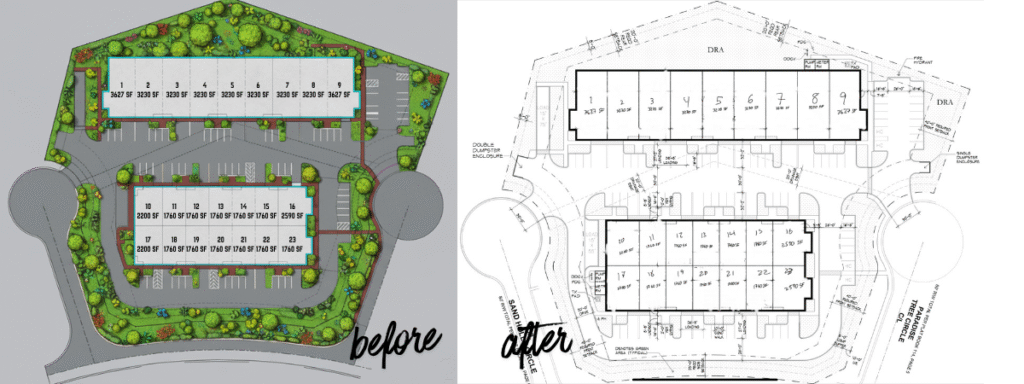
So I tried a new method: a mix of manual work + AI.
Step 1: Begin With the AutoCAD Plan.
The black-and-white drawing that I got is the first picture. It worked well with construction but not with presentations and brochures.
Step 2: Bring into SketchUp (10-15 Minutes of Work)
I brought the file into SketchUp and performed some hasty actions:
Cleaned the lines
Fixed scaling
Organized the drawing
Added basic figures of roads and green space.
This step took just 10-15 minutes.
This is important because:
Perfect results of AI can be achieved only when it is properly directed.
Think of AI like a KG student.
Unless you point it the right way, it will do it by guessing.
Step 3: Allow AI to add the Colors and Landscaping.
Once the base drawing was made, I left AI to do the rest.
AI added:
Grass
Trees
Plants
Shadows
Color textures
Clean layout details
The dull drawing was turned into a colorful beautiful site plan in a couple of minutes.
Step 4: Final Touch-Ups
No AI result is 100% perfect.
So I made a few small fixes:
Adjusted colors
Corrected edges
Fixed landscape shapes
These minor changes gave the end result a professional appearance.
The Real Lesson
This is the great lesson I gathered:
With proper guidance, AI would become your best friend.
You do a little manual work. AI does the heavy work.
In this manner, you have rapid, clean, and quality results.
Before & After
Prior: An ordinary black and white AutoCAD plan.
After: A colorful site map prepared to be marketed and to clients of real estate.
This process is time-saving and produces fantastic outcomes.
Want Your Sketch or Plan Coloured Like this?
You have a hand drawing or a CAD drawing or any plan of site and desire the same effect of attractive colorful output…
Get in touch with me – I can make your sketch a clean site plan just as you see.
Fiverr: https://www.fiverr.com/s/WEpE2eX
Upwork: https://www.upwork.com/freelancers/sohailahmad184