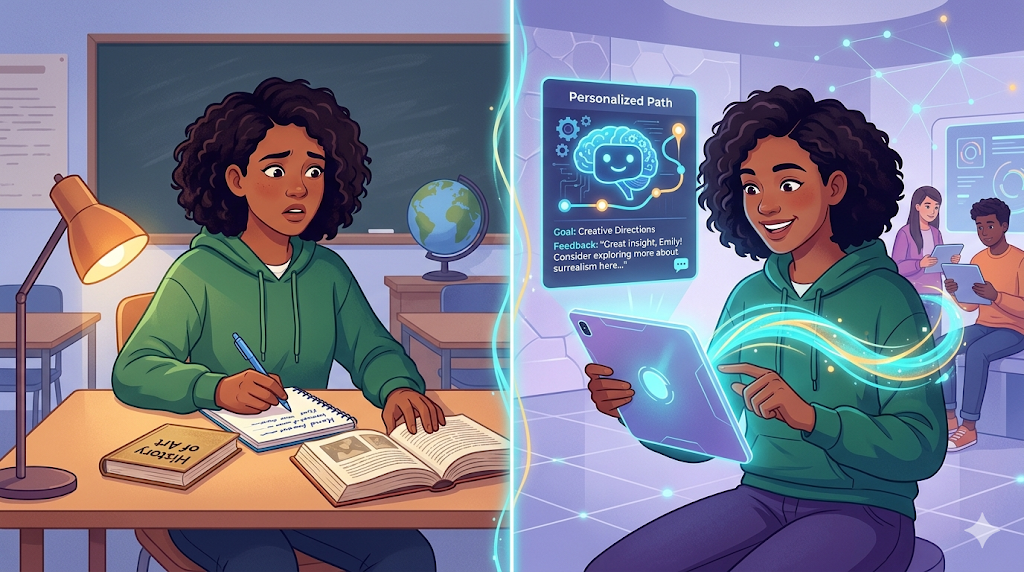
Remember when “knowing how to use a computer” meant typing forty words per minute on a beige keyboard? Today, that baseline is undergoing a dramatic shift. Typing speed no longer sets you apart in the modern workplace; instead, your ability to direct artificial intelligence is becoming the new standard. Just as spreadsheets revolutionized accounting in the 1980s, understanding AI Skill Pathways is now the defining competitive advantage for career longevity. We are moving away from merely consuming technology to actively collaborating with it, and this transition requires a completely different mindset.
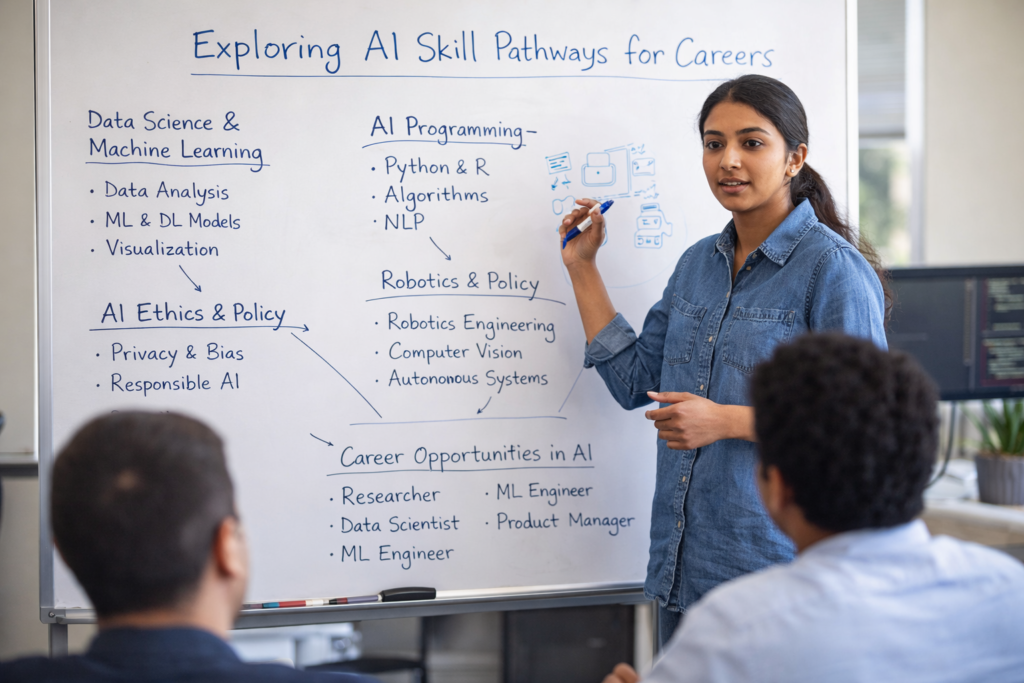
Delegating tasks to a machine feels intimidating at first, but it helps to think of AI as a very fast, very literal intern. Imagine hiring a brilliant graduate on their first day: they have read every book in the world, yet they know absolutely nothing about your specific company or what you actually want them to do. Asking this intern to simply “write an email to the client” usually yields a generic, robotic response. Giving clear context and precise instructions to this eager assistant—a practice known as prompting—is the fundamental first step in making the technology work for you.
Industry data reveals that while millions of people have tried tools like ChatGPT, a significant portion abandon them after getting mediocre results. Staring at a blank screen, people often type a vague request and quickly write off the technology when the output falls flat. Overcoming the AI learning curve is rarely about mastering complex computer science; instead, it requires shifting your approach from a passive user to an active architect. You are no longer doing all the repetitive drafting yourself, but you are entirely responsible for giving the right orders and checking the final work.
Beginning your AI education can feel overwhelming, which is why treating your professional development like a video game progression makes the journey manageable. Enter the concept of the AI Skill Tree. Just as a character in a game must unlock basic movement before learning advanced acrobatics, you need to master simple, single-step interactions before attempting to automate your entire week. Nobody needs an advanced engineering degree to climb this tree, but everyone must conquer Level 1 before successfully jumping to Level 3.
Formal AI skills training is rapidly shifting from a niche technical requirement to a universal professional necessity. By breaking down these pathways into manageable steps, you will quickly move past the frustration of bad outputs and discover hours of newfound creative freedom. Building your command list and unlocking foundational skills future-proofs your daily workflows.
Thinking in Skill Trees: Why You Don’t Need a Math Degree to Master AI
Staring at articles about complex algorithms can make anyone feel like they missed the boat on the future of work. However, mastering AI doesn’t require a computer science degree or a sudden passion for advanced calculus. Because you already know artificial intelligence is simply a new type of software, you have the exact foundation needed to succeed right now.
The secret to navigating this learning phase is adopting the “driver versus mechanic” mental model. A mechanic must understand every valve, spark plug, and gear to build an engine from the ground up. A driver, on the other hand, simply needs to know the rules of the road to safely reach their destination. You are learning to drive this powerful new technology, not engineer it from scratch.
Grasping this distinction frees you to focus on leading the tool rather than building it. By taking on the driver’s mindset, you can confidently steer your digital assistant through daily tasks without worrying about the math happening under the hood. Mapping out your journey across the three rungs of AI fluency determines your daily efficiency and long-term career value.
The Three Rungs of AI Fluency: Which Career Path is Yours?
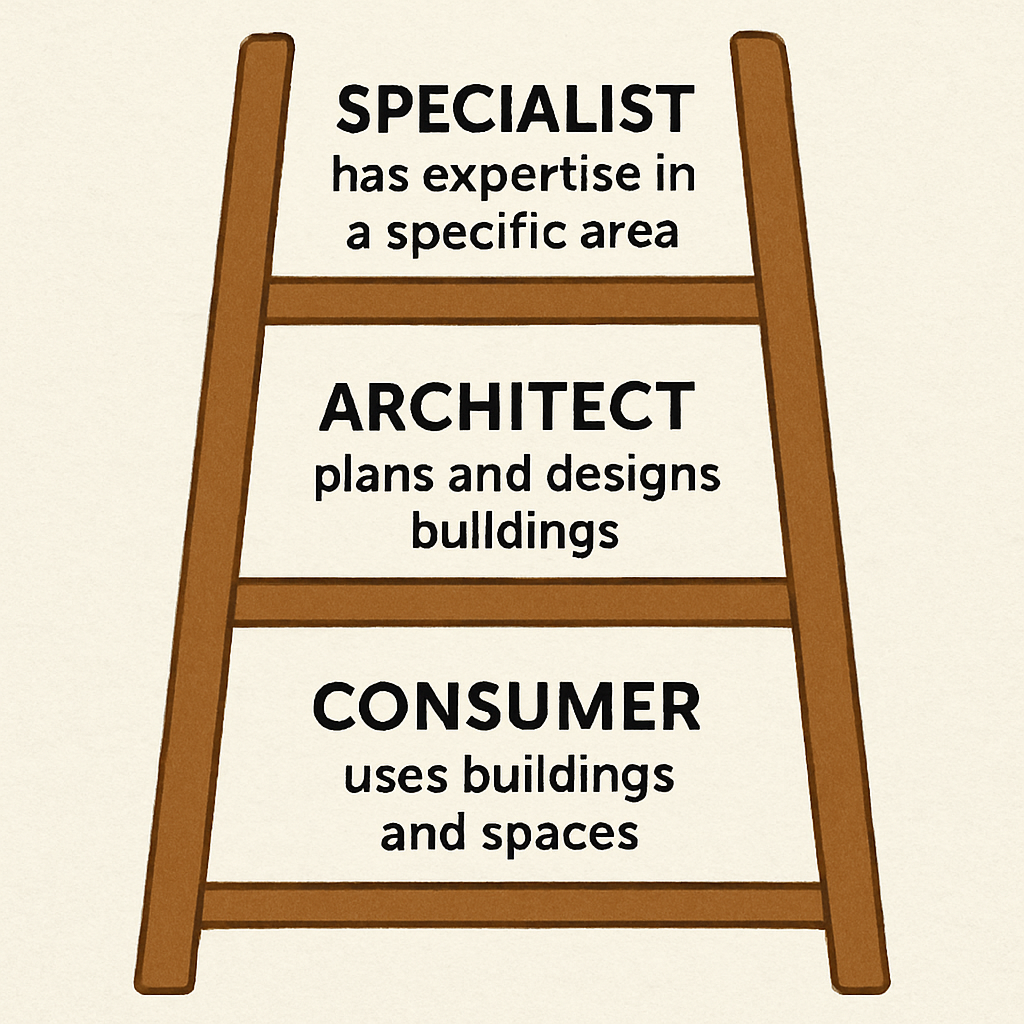
Figuring out exactly where you fit into the future of work is much easier when you have a map. Instead of stressing over highly technical routes like machine learning vs deep learning career paths, everyday professionals can categorize their growth using three practical AI Skill Pathways. Choosing your destination on this ladder determines your daily efficiency and long-term career value.
Every professional journey fits onto one of these distinct rungs:
- The Consumer: You actively use tools like ChatGPT to draft emails or summarize reports, gaining a quick ROI of a few saved hours each week.
- The Architect: You connect these tools into workflows, like automatically routing AI-generated meeting notes directly to a team project board, saving hours daily.
- The Specialist: You apply AI to solve unique departmental challenges, driving massive organizational value without necessarily being a programmer.
Most people only need to master the first two levels to completely future-proof their careers and transform their workday. Since everyone must start at the very first rung, your immediate goal is simply learning how to give better instructions. Effectively leading your new “literal intern” requires a specific communication approach.
How to Lead the ‘Literal Intern’: Mastering Prompt Engineering Without Code
Think of your favorite AI chatbot not as a search engine, but as an incredibly fast, highly enthusiastic, and completely literal intern. When we treat artificial intelligence like traditional software, we tend to punch in short search terms and cross our fingers. To actually save hours of work, you have to shift your approach from typing a simple search query to actively delegating a project.
Mastering this delegation mindset is the true secret behind prompt engineering for non-technical professionals. You might see online influencers selling “magic keywords” to unlock AI, but the reality is much more practical. The difference between a useless response and a brilliant one usually comes down to contextual prompting, which simply means giving the tool enough background information to understand the actual goal of your task.
Consider how you would ask a human assistant to handle a frustrated customer. You would never just shout “fix this complaint!” because they wouldn’t know the customer’s history or your company’s standard tone. Instead, you would share the original email, explain the ideal resolution, and ask them to draft a polite apology. Building these communication habits ranks among the most essential core AI competencies because the technology requires that exact same level of collaboration to succeed.
By treating the chat window as a conversation with a capable partner, you stop fighting the tool and start guiding it. Once you embrace this leadership role, the next step is structuring your instructions so the AI gets it right on the very first try. Breaking down the anatomy of a high-impact prompt turns this theory into immediate action.
The Anatomy of a High-Impact Prompt: 3 Steps to 10x Better Results
Assigning projects to your new “literal intern” requires a reliable formula. Providing structured instructions prevents the frustration of unpredictable, generic responses. The quickest way to master prompt engineering is by adopting the PTC framework.
Before hitting send, run your request through this simple checklist:
- Persona: Assign a specific role. (“Act as an expert career coach.”)
- Task: Define the exact goal. (“Draft a polite rejection email.”) Providing a “one-shot” example—pasting one previous email you liked—drastically improves this step.
- Constraints: Set clear boundaries. (“Keep it under 100 words, use a warm tone.”)
Combining these three elements forms the backbone of practical AI applications.
Even with excellent instructions, the first draft might still need minor adjustments. Instead of starting completely from scratch, use an iterative feedback loop by replying directly with “make it a little punchier” or “shorten the second paragraph.” With successful steering established, finding the right AI tools solves broader workflow bottlenecks.

How to Find the Right AI Tools for Your Specific Tuesday Problems
We all have a “Tuesday Problem”—that tedious chore you dread every week, like formatting reports or extracting email action items. Instead of getting overwhelmed by constant software announcements, audit your workday to spot these high-friction tasks. Tracking exactly where your hours go reveals the repetitive bottlenecks a digital assistant could easily handle.
Chasing flashy features leads straight to tool fatigue, leaving you with multiple subscriptions but no extra free time. The secret to effective tool selection is ignoring industry hype and focusing strictly on whether a solution fixes your specific bottleneck. Many modern training programs emphasize this pragmatic approach, teaching you to choose applications based on everyday reliability rather than futuristic promises.
Verifying a tool’s output quality is the final step before fully adopting it. Once an application consistently saves you time instead of creating more manual editing work, you have mastered the foundational phase of your AI skills training. Connecting these proven tools naturally prepares you for the next major productivity leap.
From One-Off Chats to Automated Workflows: Leveling Up to AI Architect
Manually copying text into ChatGPT is fine for beginners, but it eventually creates a new bottleneck. Stepping into the role of an AI Architect means you stop babysitting the software and start designing invisible background assistants. Calculating the time-ROI of these systems is simple: if a two-hour setup saves thirty minutes weekly, it pays for itself in a month. Mastering this architectural mindset is quickly becoming a core part of foundational technical skills in the modern workplace.
Understanding how these systems operate relies on the Trigger-Action model. Think of this like setting up a line of dominoes where one specific event automatically knocks over the next. A “trigger” like receiving a client email sparks an “action” where your digital intern drafts a summary and saves it directly to your calendar. Applying these implementation strategies completely removes you from being the manual middleman moving data between different browser tabs.
Spotting opportunities for multi-step workflows simply requires looking at tasks that always happen sequentially. If reading a weekly metrics report always leads to drafting an email update, those connected chores belong together in one automated system. You are teaching your assistant to handle a complete process instead of just doing a single chore. This shift naturally prepares you for bridging the gap with no-code automation.
Bridging the Gap with No-Code Automation: AI Tools That Talk to Each Other
Making your digital dominoes fall across different software requires a translator. No-Code Automation platforms like Zapier or Make step in here as “App Connectors.” They act as digital glue, allowing your inbox to speak directly to your AI assistant without you writing any code.
Linking these everyday apps lets you build hands-off systems that completely automate repetitive administrative data entry. Building these bridges is now a vital professional capability. Try these three starter automations:
- Email to Summary: Send long client emails to AI, which drops a quick, actionable summary into your digital notepad.
- Form to Chat: Have AI read new customer web forms, categorize their urgency, and instantly ping your team’s message board.
- Receipt to Tracker: Let AI extract totals from attached email invoices and log them into your budget spreadsheet automatically.
Before enrolling in expensive programs to master this, try connecting just two tools together first. However, as your background assistant processes more information independently, you must verify its accuracy. That means understanding why AI “hallucinates” and how to spot a digital lie.
Why AI ‘Hallucinates’ and How to Spot a Digital Lie
Delegating tasks to a background assistant is highly efficient, but it comes with a catch: sometimes, your AI makes things up. Overcoming the learning curve means realizing your tool isn’t a massive encyclopedia checking facts. Instead, it is a “Prediction Engine.” Much like your phone’s autocorrect guessing the next word in a text message, AI constantly calculates the most logical next word to answer your prompt.
This guessing game creates a “Stochastic Mirror.” At their core, natural language processing frameworks rely on pattern recognition to reflect the vast, messy internet back at you. Because AI prioritizes sounding believable over being strictly truthful, it will confidently invent fake statistics, nonexistent books, or incorrect dates if they fit the pattern of a good sentence. These confident lies are known as “hallucinations.”
Protecting your professional credibility means you cannot blindly trust these generated results. Whether drafting client emails or summarizing invoices, you must treat the software like a brilliant but careless intern. Spotting a digital lie requires a reliable system to fact-check the mirror’s reflection before hitting send.
The 3-Step Verification Protocol for Every AI Output
Because we know NLP fundamentals rely on prediction rather than absolute truth, you can never completely hand over the steering wheel. This reality makes the “Human-in-the-Loop” (HITL) philosophy your most valuable habit. Rather than letting the software run on autopilot, you must step in as the mandatory final editor to protect your professional reputation.
Making this review process efficient requires a consistent system. Use the ‘Trust but Verify’ Checklist before finalizing any generated work:
- Cross-reference facts: Verify all dates, statistics, and specific claims against reliable external sources.
- Check logical consistency: Ensure the AI’s reasoning holds up and its conclusions actually match the data you provided.
- Review for tone: Adjust the language so it sounds like you, not a robotic corporate manual.
Mastering this quick review cycle turns potential embarrassments into massive time-savers. Now that you know how to safely manage these outputs, you are ready to apply these strategies to streamline your workday.
Implementing Generative AI Strategies in Your Current Role
We’ve all stared at our weekly responsibilities wishing the busywork would just disappear. Now that you can safely verify outputs, the next step is applying practical AI applications directly to your job description. Think of this as shifting from a solo worker to an “AI-Augmented” professional. You are no longer just doing tasks; you are managing a very fast, literal intern.
Spotting the best chores to hand off requires looking for high-Return on Investment (ROI) opportunities. These are repetitive, time-consuming tasks that drain your energy—like summarizing long reports, sorting email chains, or drafting standard weekly updates. By picking these specific bottlenecks first, you experience immediate schedule relief, proving AI is a practical collaborator rather than just a tech novelty.
Recovering those lost hours creates the perfect blueprint for your colleagues to follow. Sharing these tangible time-savings often inspires broader training programs at work, naturally positioning you as a forward-thinking leader in your office. These delegation quick wins transform everyday corporate departments.
AI for Non-Technical Specialists: High-Value Wins in Marketing and HR
Marketing teams no longer need to start every campaign from scratch. With basic AI skills training, you can feed one successful blog post to your AI assistant and instantly transform it into five social media updates and a targeted newsletter. This workflow repurposes content ten times faster while personalizing external communications for different audiences at an incredible scale.
Over in Human Resources, specialists use these exact same tools to dig out from under mountains of paperwork. Instead of manually scanning hundreds of applications, an HR manager can prompt the AI to quickly summarize candidates’ core competencies from their resumes. You still make the final hiring decision, but the tool streamlines recruitment by highlighting relevant experience in mere minutes.
Exploring these departmental quick wins is a practical first step for anyone moving into an AI-focused role. Handing off these bottlenecks frees up your schedule, but it also raises an important question about your long-term role in the office. Now that the busywork is delegated, we must look at the human skills that machines cannot replicate.
The ‘Human-Only’ Skillset: What AI Can’t Replace (and Why It Makes You More Valuable)
Once you hand off the repetitive busywork to a digital assistant, your daily focus shifts from generating output to managing outcomes. This evolution builds your “Human-Only Moat”—a protective barrier around the interpersonal skills that machines simply cannot replicate. While software is phenomenal at summarizing massive spreadsheets, closing the talent gap requires professionals who excel at empathy, ethical judgment, and reading the emotional temperature of a meeting.
You step into the role of the essential decision-maker by leaning heavily on your strategic intuition. Think of AI as an incredibly fast but literal intern who brings you five potential solutions to a delicate client dispute; only you possess the relationship history needed to choose the right path. Pairing this human nuance with core technical competencies ensures you remain the vital pilot steering the ship, rather than getting replaced by the autopilot.
Doubling down on these distinctly human capabilities guarantees your long-term value as the workplace transforms. You don’t need to build the robot to lead it, but grasping the basic mechanics of how it processes information makes you a much better manager. Directing these tools with real confidence requires understanding basic technical mental models.
Technical Mental Models for Non-Engineers: NLP and Data Basics
Managing your new digital intern requires understanding how it reads, a concept known as Natural Language Processing (NLP). Imagine a massive library where the AI has memorized the exact placement of every published word. Grasping these fundamentals means realizing the system doesn’t “understand” your project; it simply identifies patterns based on its vast reading history.
When asked to write an email, the tool plays a massive game of next-word prediction. It relies entirely on its training data—billions of documents fed into it—to guess which word logically follows another. You don’t need to know the foundational math for machine learning to see the catch: if the original training data is biased or outdated, the AI’s suggestions will reflect those same flaws.
The quality of that digital library strictly dictates the quality of your results. Recognizing this connection transforms you from a passive user into a confident director who spots errors quickly. With these basic mental models established, you are ready to map out your upskilling journey and decide how to structure your training.
Self-Taught AI vs. University Degrees: Choosing Your Training Program
Facing the booming tech landscape leaves many professionals wondering if they need to return to college. When weighing self-taught education vs a university degree, the return on investment heavily favors moving quickly. Traditional four-year programs are excellent for engineers building the technology, but they move too slowly for everyday users. By the time a university prints a textbook, the software has already updated three times.
Rather than chasing a diploma, aim for a “Minimum Viable Education”—learning just enough rules of the road to safely drive the car. If you want to know how to start from scratch, the most effective strategy is “learning by building.” This means closing the textbooks and using these tools to solve an actual daily problem. Forcing an AI to draft your weekly team update teaches you more about its practical quirks than theoretical lectures ever could.
Evaluating your options means prioritizing hands-on practice over theory. As you compare different training programs, look for interactive platforms that require you to build small, useful projects instead of passively watching videos. Proving these new skills to hiring managers requires knowing which certifications actually matter.
Which AI Certifications Actually Matter to Employers?
Seeing the sudden flood of “AI Expert” badges on LinkedIn leaves many professionals wondering what credentials actually carry weight. Treating your training as an investment means dodging overpriced “certificate mills” that just trade money for a PDF. Instead, seek reliable credentials that signal genuine “AI Literacy”—proving to employers that you know how to safely direct these digital interns without creating extra work.
The safest route is sticking with the tech giants who are actually building the tools. These foundational programs don’t require coding; they simply teach the basic rules of the road. Prioritize these three recognized credentials:
- Google AI Essentials: Focuses heavily on practical, daily productivity tasks.
- Microsoft Azure AI Fundamentals: Great for understanding how AI integrates into everyday business software.
- IBM AI Foundations: A clear, jargon-free overview of what AI can and cannot do.
Earning these official badges helps your resume pass the initial screening filters. Yet, hiring managers ultimately want to see those tools applied to real workflows. To truly stand out, you must combine that official paper with hands-on proof, requiring a well-built AI project portfolio that wins jobs.
How to Build an AI Project Portfolio That Wins Jobs
Handing a hiring manager certificates proves you read the manual, but building a project portfolio proves you can actually drive the car. When navigating a transition to AI-augmented roles, employers prioritize how much time you can save them. They want tangible evidence that your skills translate into faster daily operations.
Capturing this evidence starts by keeping an AI Project Journal. Whenever you use a tool to solve a bottleneck, document the “Before and After” efficiency gains. For instance, note that drafting a weekly report used to take three hours of manual typing, but by guiding a language model, it now takes twenty minutes.
Transforming these journal entries into a structured workflow portfolio provides the ultimate proof of practical tool mastery. Rather than simply claiming you know the tools, you offer a visual document showing the exact steps used to direct your digital intern. With this concrete evidence assembled, you are perfectly positioned to pitch your value to employers.
How to Pitch Your AI Mastery to Employers and Bridge the Talent Gap
Stepping into an interview with a portfolio is only half the battle; you must also speak the business’s language. During interviews, hiring managers rarely care which specific prompt you used. They care entirely about Return on Investment (ROI)—how much time, money, or frustration your skills save the company. Framing your “Before and After” scenarios around concrete business wins instantly transforms you from a casual tool user into a strategic problem solver.
Organizations desperately need people who can apply these tools to daily office workflows. By positioning yourself as a practical, “AI-enabled” professional, you become the crucial link capable of closing the organizational talent gap. You are not applying to build the robot from scratch, but rather offering to direct their digital interns so the entire team can run faster.
This results-driven mindset perfectly satisfies modern entry-level requirements, which prioritize daily workflow automation over complex technical architecture. Mapping out these exact steps creates a practical 30-day upskilling roadmap.
Your 30-Day AI Upskilling Roadmap: Step-by-Step to Mastery
Now that you understand how to pitch your business value, you need a focused execution plan to build that expertise. The sheer volume of new information can easily feel overwhelming. Instead of trying to master every single app on the market, you need a targeted sequence that turns curiosity into capability without the burnout.
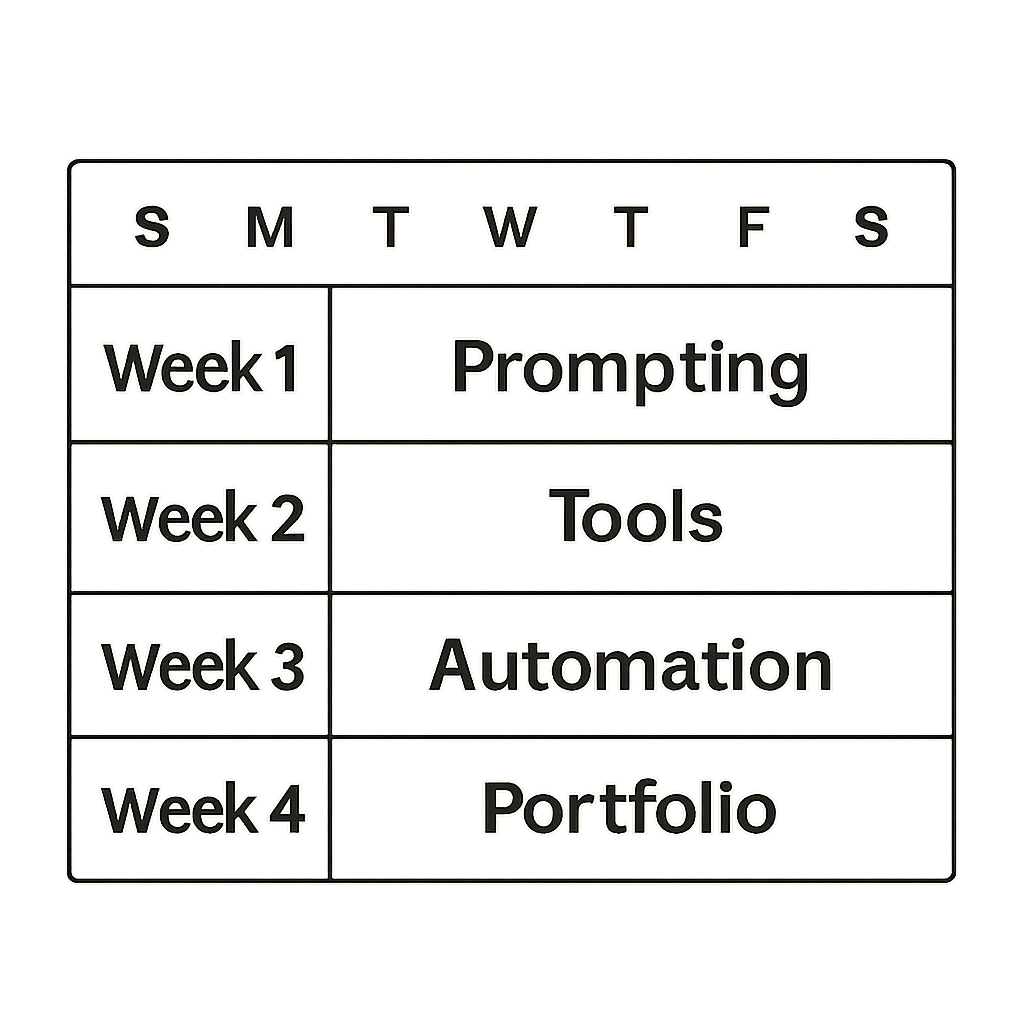
The secret to scaling this learning curve is breaking the journey into manageable, weekly milestones. Think of this as your personal boot camp, designed to build your confidence step-by-step:
- Week 1: Prompting. Master the art of giving clear instructions to your digital intern.
- Week 2: Tool Discovery. Explore one new platform daily to see what exists.
- Week 3: Automation. Connect tools together to save an hour of your normal workday.
- Week 4: Portfolio. Document three “Before and After” workflows to prove your value.
Consistency matters far more than intensity when navigating these Skill Pathways. Dedicating just fifteen minutes during your morning coffee to test a new prompt builds a permanent daily habit of continuous exploration.
Following this structure guarantees your transition from a passive user to an active specialist in just one month. However, the exact platforms you master today will inevitably update, merge, or change by next year. Because the technology moves so quickly, staying adaptable future-proofs your career.
Staying Adaptable: How to Future-Proof Your Career in a Changing Tech Landscape
Before this journey, keeping up with AI might have felt like chasing a fast-moving train. Now, you understand that building foundational technical skills isn’t about memorizing how one specific tool works today. It is about developing adaptable mental models. Tools will constantly change, making your adaptability and curiosity your greatest assets. By focusing on essential skills rather than temporary software trends, you proactively secure your own career.
Start your roadmap today by picking one mundane daily task—like drafting a tricky email—and collaborating with an AI to complete it. Notice how your confidence grows as you practice leading the technology. When you build a habit of monitoring industry shifts and adjusting your routines, the fear of falling behind disappears. You are no longer just reacting to new software; you are actively directing your workflow and ready to navigate the future.